Yeelight Pro S20网关(增强版)接入 home assistant
Yeelight pro网关接入Home assistant,有三种方式:
1.homekit
2.matter
3.局域网协议 - 使用第三方集成
本文描述的是使用第三方集成。
基于 Home Assistant 的 Yeelight Pro Integration,实现设备实体的本地局域网控制.
网关设备信息
Yeelight Pro S20网关(增强版)
型号:YP-0194
网关接入ha简要步骤说明
要将Yeelight Pro S20网关(增强版)成功接入home assistant,需要做以下几件事情:
1.下载Yeelight pro app
2.在Yeelight pro app中添加网关和子设备
3.在Yeelight pro app中打开网关的局域网设置
4.在home assistan中用https://github.com/hasscc/yeelight-pro integration将网关接入home assistant。
测试情况 - 接入yeelight pro app
网线连接 - yeelight pro app 添加成功,但app中显示未绑定。
无线连接 - yeelight pro app 添加成功,app中显示已绑定(2.4Gwifi)。
接入ha前准备工作
1.易来pro app内网关打开局域网控制功能
2.路由器或易来APP对网关进行静态IP设置
Integration
Yeelight Pro Integration for Home Assistant
https://github.com/hasscc/yeelight-pro
Connect call failed ('192.168.2.126', 65443)
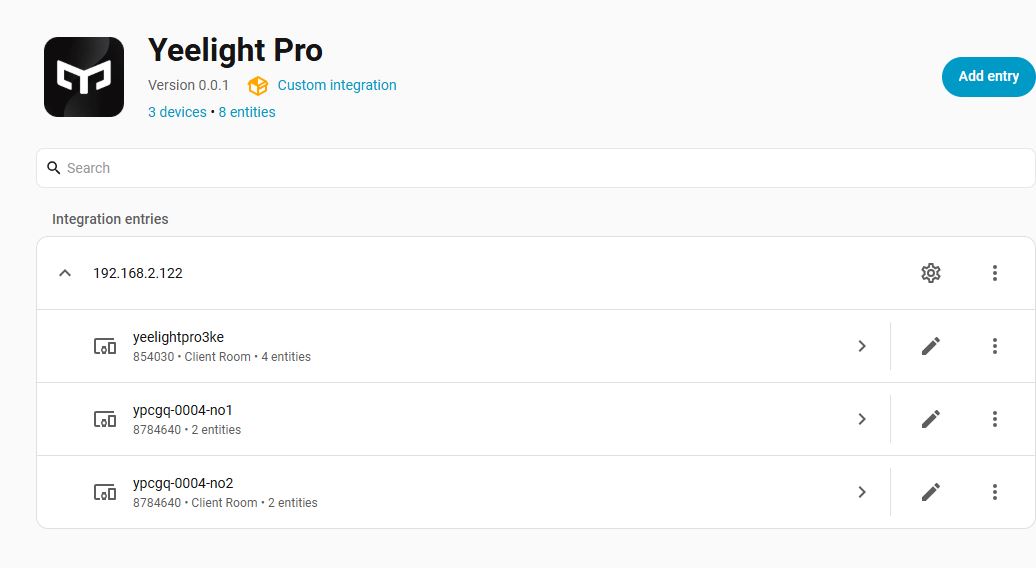
重启完homeassistant后直接输入网关IP地址,自动获取网关内所有设备与实体。
Useful links
YLP-S20网关-灰色-Mesh-增强版_产品介绍
https://cn.yeelight.com/zh_CN/pro-detail?id=96
YLP-S20网关-灰色-Mesh-增强版_说明书
https://rag-resources.yeelight.com/products/sku-res/1-000003969/split/1-000003969_split.pdf
ethan-z11/Yeelight_Pro
https://github.com/ethan-z11/Yeelight_Pro
blog:
https://bbs.hassbian.com/forum.php?mod=viewthread&tid=31339
Comments
Comments are closed